 by
by Whether you're resolving hardware malfunctions, setting up complex networks, or offering IT support to users, your computer technician resume is your first opportunity to demonstrate troubleshooting skills and commitment to operational excellence.
This article provides tailored examples for various types of specialists. Each resume sample includes a breakdown of its strengths and suggestions to help you create your own high-impact application.
Computer technician resume examples
- Computer technician entry-level resume
- Help desk computer technician resume
- Computer repair technician resume
Computer technician entry-level resume
Entry-level computer technician resume template
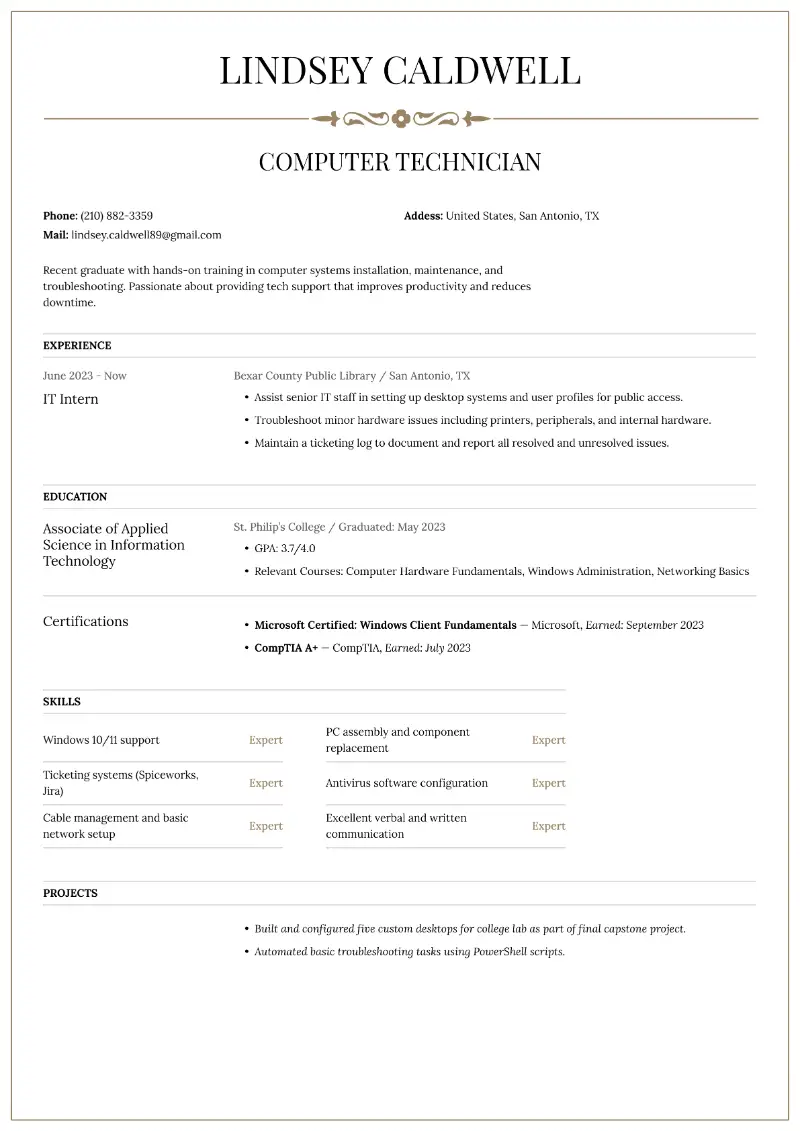
Entry-level computer technician resume sample | Plain text
Name: Lindsey Caldwell
Location: San Antonio, TX
Email: lindsey.caldwell89@gmail.com
Phone: (210) 882-3359Objective
Recent graduate with hands-on training in computer systems installation, maintenance, and troubleshooting. Passionate about providing tech support that improves productivity and reduces downtime.
Experience
IT Intern
Bexar County Public Library, San Antonio, TX
June 2023 – Present
- Assist senior IT staff in setting up desktop systems and user profiles for public access.
- Troubleshoot minor hardware issues including printers, peripherals, and internal hardware.
- Maintain a ticketing log to document and report all resolved and unresolved issues.
Education
Associate of Applied Science in Information Technology
St. Philip’s College, San Antonio, TX
Graduated: May 2023
- GPA: 3.7/4.0
- Relevant Courses: Computer Hardware Fundamentals, Windows Administration, Networking Basics
Certifications
- Microsoft Certified: Windows Client Fundamentals — Microsoft, Earned: September 2023
- CompTIA A+ — CompTIA, Earned: July 2023
Skills
- Windows 10/11 support
- PC assembly and component replacement
- Ticketing systems (Spiceworks, Jira)
- Antivirus software configuration
- Cable management and basic network setup
- Excellent verbal and written communication
Projects
- Built and configured five custom desktops for college lab as part of final capstone project.
- Automated basic troubleshooting tasks using PowerShell scripts.
Why this resume for computer technician works?
- Clearly explains educational background and relevant coursework.
- Shows real-world internship with tangible tasks.
- Includes certifications with exact dates and a bonus project section of resume for added depth.
How to format a computer tech resume?
- Limit the document to one page resume format for those with less experience.
- Seasoned professionals may extend to a second page resume format if the content remains directly relevant.
- Choose simple typefaces such as Calibri, Arial, Helvetica, or Segoe UI for a polished appearance.
- Maintain font sizes between 10.5 and 12 points for body text.
- Avoid decorative or novelty fonts, as they may hinder legibility.
- Keep uniform margins between 0.75 and 1 inch on all sides.
- Use single spacing within each section of resume.
- Start each statement with a compelling verb that conveys initiative.
- Incorporate industry-relevant expressions like “system imaging,” “hardware diagnostics,” “endpoint protection,” or “virtual machine setup.”
- Align role titles to the left and employment dates to the right.
- Stick to a minimal color scheme, typically black and white.
- Save the paper as a PDF unless another format is requested.
- Proofread thoroughly to eliminate spelling mistakes.
To guarantee you cover every essential detail, consider making resume with AI.
Resume Trick offers a variety of polished and modern resume templates that suit different industries and experience levels.
Create your professional Resume in 10 minutes for FREE
Build My Resume
Help desk computer technician resume
Help desk computer technician resume example
Name: Marcus Leone
Location: Raleigh, NC
Email: marcus.leone@protonmail.com
Phone: (919) 412-9975Summary
Customer-focused Help Desk Technician with over 6 years of experience resolving user issues across software, hardware, and network platforms. Strong communicator with a proven ability to solve technical problems quickly and professionally.
Experience
Help Desk Technician II
WakeMed Health & Hospitals, Raleigh, NC
March 2021 – Present
- Manage 50–70 support tickets daily in ServiceNow across Level 1 and Level 2 support tiers.
- Troubleshoot EMR software, printer connections, and login credential issues.
- Train new employees in remote troubleshooting procedures and documentation standards.
- Recognized with “Outstanding Support Staff” award in 2023.
IT Support Assistant
TechSavvy Inc., Durham, NC
August 2019 – March 2021
- Provided phone and email support for clients facing Windows and Office 365 issues.
- Resolved connectivity issues including DNS/DHCP conflicts.
- Maintained asset logs and updated system documentation regularly.
Education
Bachelor of Science in Information Systems
North Carolina Central University, Durham, NC
Graduated: May 2019
Certifications
- ITIL Foundation — AXELOS, Earned: January 2022
- CompTIA A+ — CompTIA, Earned: March 2020
Skills
- Ticketing platforms: ServiceNow, Zendesk
- Remote access: TeamViewer, AnyDesk
- Active Directory user management
- Knowledge of HIPAA data security compliance
- Time management and multitasking
Awards
- Outstanding Support Staff – WakeMed Health & Hospitals, 2023
Languages
- Chinese (fluent)
- Spanish (conversational)
Why this PC technician resume is effective?
- Demonstrates upward career movement from assistant to Level 2 support.
- The awards section of resume highlights recognition for performance, which sets the candidate apart from others.
- Including languages adds value, especially in customer-facing support roles.
How to choose between summary and objective?
Use a summary in resume if:
- You have relevant experience in IT.
- You're continuing in the same or similar field.
- You want to outline your achievements and key strengths right away.
Example of a computer technician resume summary:
Computer technician with 4 years of experience supporting hardware and software in healthcare settings. Knowledgeable in HIPAA compliance, EMR systems, and secure data handling. Adept at resolving technical issues under pressure while maintaining patient confidentiality.
Pick an objective for resume if:
- You’re just starting out (entry-level or students).
- You’re changing careers or shifting from a different industry. You want to emphasize your goals and motivation.
Example of a computer technician resume objective:
To secure a mobile computer technician role that allows me to troubleshoot and resolve hardware issues onsite while continuing to grow professionally in hands-on environments.
How to list education on a computer resume?
Structure:
- Degree Type
- Institution Name
- Location (City, State)
- Graduation Date (or Expected Date)
- Relevant Coursework
For recent graduates with a strong academic record, writing your GPA (if it is 3.0 or higher) can help demonstrate your work ethic. As you gain more experience, focus on higher education and certifications.
Computer repair technician resume
Computer repair technician resume template
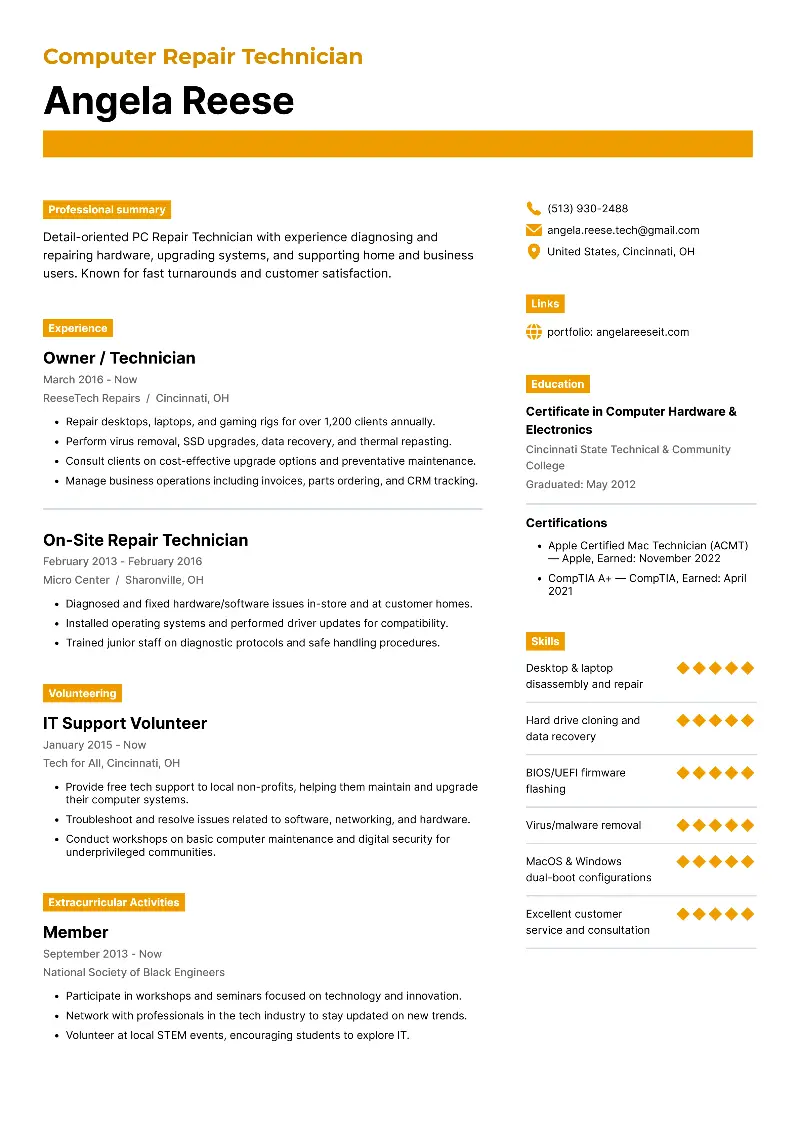
Computer repair technician resume sample | Plain text
Name: Angela Reese
Location: Cincinnati, OH
Email: angela.reese.tech@gmail.com
Phone: (513) 930-2488
Portfolio: angelareeseit.comSummary
Detail-oriented PC Repair Technician with experience diagnosing and repairing hardware, upgrading systems, and supporting home and business users. Known for fast turnarounds and customer satisfaction.
Experience
Owner / Technician
ReeseTech Repairs, Cincinnati, OH
March 2016 – Present
- Repair desktops, laptops, and gaming rigs for over 1,200 clients annually.
- Perform virus removal, SSD upgrades, data recovery, and thermal repasting.
- Consult clients on cost-effective upgrade options and preventative maintenance.
- Manage business operations including invoices, parts ordering, and CRM tracking.
On-Site Repair Technician
Micro Center, Sharonville, OH
February 2013 – February 2016
- Diagnosed and fixed hardware/software issues in-store and at customer homes.
- Installed operating systems and performed driver updates for compatibility.
- Trained junior staff on diagnostic protocols and safe handling procedures.
Education
Certificate in Computer Hardware & Electronics
Cincinnati State Technical & Community College
Graduated: May 2012
Certifications
- Apple Certified Mac Technician (ACMT) — Apple, Earned: November 2022
- CompTIA A+ — CompTIA, Earned: April 2021
Skills
- Desktop & laptop disassembly and repair
- Hard drive cloning and data recovery
- BIOS/UEFI firmware flashing
- Virus/malware removal
- MacOS & Windows dual-boot configurations
- Excellent customer service and consultation
Volunteering
IT Support Volunteer
Tech for All, Cincinnati, OH
January 2015 – Present
- Provide free tech support to local non-profits, helping them maintain and upgrade their computer systems.
- Troubleshoot and resolve issues related to software, networking, and hardware.
- Conduct workshops on basic computer maintenance and digital security for underprivileged communities.
Extracurricular Activities
Member
National Society of Black Engineers, Cincinnati, OH
September 2013 – Present
- Participate in workshops and seminars focused on technology and innovation.
- Network with professionals in the tech industry to stay updated on new trends and tools.
- Volunteer at local STEM events, encouraging students to explore IT and engineering careers.
Why this computer repair resume is strong?
- Entrepreneurial expertise proves self-sufficiency and customer management.
- Volunteering shows that the applicant stays engaged with their field beyond paid work.
- The extracurricular activities demonstrate the involvement in continuous learning and networking.
How to organize experience on a resume for technician?
- Start with your most recent job and go backward in reverse chronological resume format.
- List each title with the company name, location, and dates of employment.
- Under each position, place responsibilities in bullet points.
- When possible, use numbers to showcase your achievements.
What are the key computer technician skills for resume?
- Hard skills are teachable abilities or knowledge sets that are typically learned through education, training, or hands-on experience. They are quantifiable and can be tested or measured in some way.
- Soft skills are personal attributes and traits that enable someone to interact effectively and harmoniously with others. These are more subjective and harder to quantify, but they are equally crucial for success in the workplace.
Hard skills of computer technician:
- Hardware troubleshooting and repair
- Operating system installation and configuration (Windows, macOS, Linux)
- Network setup and configuration
- Virus and malware removal
- Data recovery and backup
- BIOS/UEFI configuration
- Hardware upgrades (RAM, SSD, GPU, etc.)
- Remote desktop support
- Cloud storage management
- Network security and firewalls
- System imaging and cloning
- Printer installation and troubleshooting
- Active Directory management
- Virtualization (VMware, Hyper-V)
- IT asset management
- Software installation and updates
- Diagnostics using tools (e.g., MemTest, CrystalDiskInfo)
- Scripting and automation (e.g., PowerShell, Bash)
- Mobile device configuration and troubleshooting
- Knowledge of TCP/IP, DNS, DHCP
- Troubleshooting hardware peripherals (keyboard, mouse, monitors)
Soft skills of computer technician:
- Problem-solving
- Communication (verbal and written)
- Customer service
- Team collaboration
- Time management
- Adaptability
- Attention to detail
- Conflict resolution
- Analytical thinking
- Patience
- Multitasking
- Stress management
- Critical thinking
- Active listening
- Empathy
- Organization
- Decision-making
- Negotiation skills
- Initiative
- Technical documentation
- Conflict management
Final Thoughts
No matter your specialization—your computer technician resume should showcase your technical skills, certifications, and most importantly, your impact on system performance or end-user satisfaction.
When you’re ready, try our online free resume creator to create a polished, professional document in minutes.
Create your professional Resume in 10 minutes for FREE
Build My Resume